



As I’m looking to find a way to optimize the application to update an item from Excel table to SharePoint, I stumbled upon a great article created by Paulie, MVP. The article describes creating a SharePoint List item using the batch requests with the REST APIs implemented in Power Automate. (Check out the reference to learn more)
Before I start the article, I would like to thank Paulie for helping me during this time when I built this Flow. I had a great one-on-one MS Teams session with him when I got stuck with an issue with the REST API and got some tips and tricks from him. Thank you so much for your great help!
So in this article, we will do a batch update to a specific item in SharePoint. I modified the action and expressions in Flow, in which it will update a particular item in the list.
Requirement:
The Excel file is stored in a document library. If the data from Excel exists in the SharePoint list, update the Start Date and Description of the item. Let’s assume the ‘Title’ field has a unique value. We will use the BATCH API to update the item.


In the ‘Actions in Flow’ section, I’m going to use this format ex. [Compose] settings which means [Action Name] Renamed Action.
Actions in Flow:
List rows present in a tableLocation– SharePoint SiteDocument Library– Document library nameFile– the Excel file data that you need to update in listsTable– table created in the ExcelDateTime Format– if you have a Date Time column, use theISO 8601settings so that you don’t need need to use addDays(…) to calculate the date – got this tip from Hiro-san, MVP


Initialize variableName - LoopControlType – IntegerValue - -1


Initialize variable - GetItemsName – GetItemsType – ArrayValue - []


[Compose] settings- Input your
siteAddressandlistName; leave thebatchsizeas issiteAddress– URL SharePoint sitelistName– Name of your list where you are going to update the itembatchsize– 1000
- Input your


Get items– SharePoint list item; Filter the item by'Title'equals to the'Title'field in Excel (assuming the'Title'is unique value)


Append to array variable - GetItems- Create a new array with the data comes from the ‘Get Items’ in SharePoint and then mapped the properties that you need to update in the list from the Excel.
"__metadata":{"type":"SP.Data.[Your List Name]ListItem"}– this is line of expression is important and you must add this

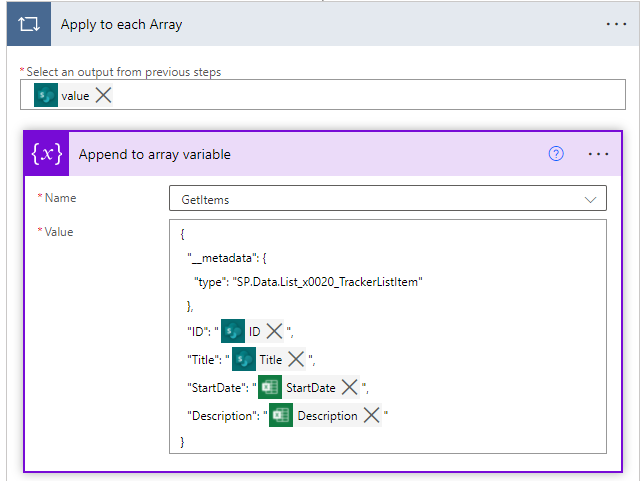
Compose – GetItems


Filter array– filtering out the empty array


Condition– check the number of data in ‘Filter array‘- If it is not equal to 0 update the item


[Compose] Template– this is the batch API template- Use
Deletein the REST API when you want to delete a specific item in the list
- Use


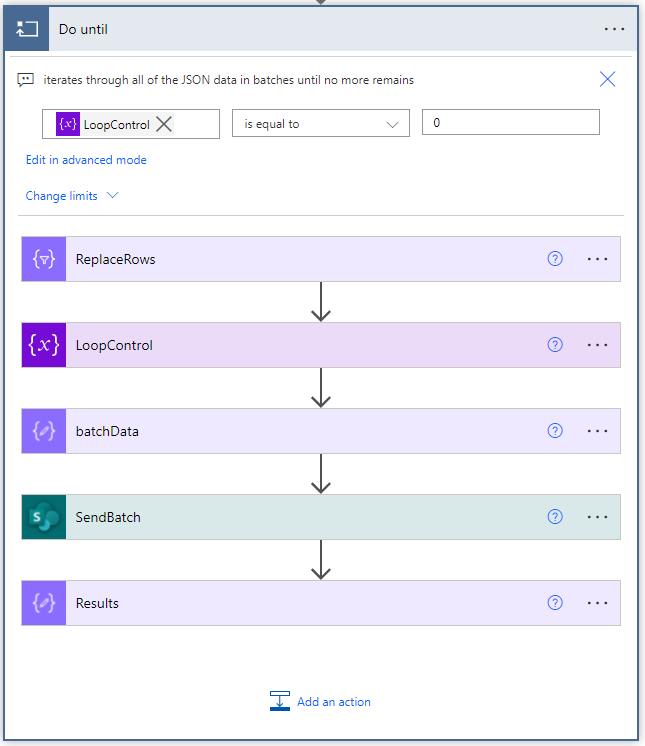
Do until– reiterate the number of the data that needs to update from the number of data inLoopControl[Select] ReplaceRows– replacing the|Row Data|and|ID|from the Template Output and replace it with the data that we get in the'Filter array'.


*From: take(skip(body('Filter_array'), mul(outputs('settings')['batchSize'], iterationIndexes('Do_until'))), outputs('settings')['batchSize'])
* Map: replace(replace(outputs('Template'), '|RowData|', string(item())), '|ID|', string(item()['ID']))
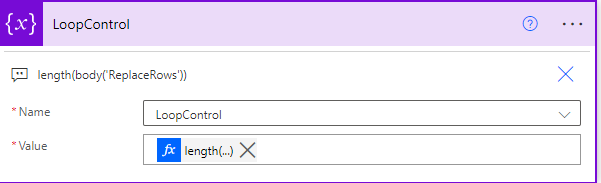
Set LoopControl variable– count the data in the ‘ReplaceRows‘

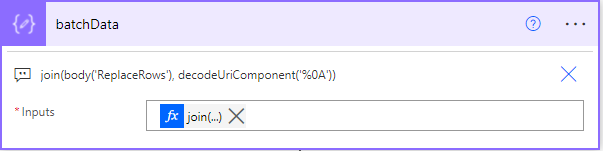
[Compose] batchData

[HTTP request to SharePoint] SendBatch– this is where it will send an update to SharePoint with the batch update action


[Compose] Results– return the string version of the content in the SendBatch request.


Conclusion:
Working with REST API is daunting, but you could do many things, especially when you want to optimize your flow. Another tip to maximize your flow is to minimize using ‘Apply to each' in your flow and using variables. 😉
Let me know if you have questions and have fun building! 🥂
You can download the flow here.
Reference:
- Make batch requests with the REST APIs
- Power Automate Flow batch create SharePoint List Items by Paulie
Featured Image by ThisIsEngineering from Pexels